Blender CMD Launcher is a small GUI utility written in Python (PySide) that simplifies launching Blender in headless mode.
It provides a GUI to configure common command-line render flags without needing to remember them, making it easier to run background renders that minimise VRAM usage and avoid loading the viewport.
- Language: Python
- Framework: PySide
- Purpose: Launch Blender headlessly (without GUI)
- License: GPL (Blender compatible)
- Source: GitHub
¶ What Does It Do?
Blender CMD Launcher simplifies launching Blender headlessly by providing a small GUI you can use to select common options and will run Blender with the selected options. It provides you with feedback via Blender's log piped into the interface. It also provides some other benefits:
- Running without the viewport can result in lower VRAM usage
- Can result in fewer crashes during heavy renders
- Consistent CLI execution
- Provides most common CLI options but via a GUI
In essence this program takes your selections, generates a CLI command like blender -b scene.blend -E CYCLES -f 1 and executes it on your behalf.
To prevent inconsistency Blender CMD Launcher passes all values shown on the GUI to Blender when executing the render. This is because Blender will take undefined settings directly from your Blend file. This helps avoid unexpected option values but can be odd if you are not expecting it.
¶ Any Advantage Over CLI?
No. If you are comfortable with running Blender via the terminal feel free to continue to do so. This app is simply to give those who prefer a GUI the option to run Blender without the overhead of the viewport, and without needing to be comfortable with the terminal which can be intimidating to use.
¶ Available Features
Currently Blender CMD Launcher provides the following features:
- Choose a Blender exe path (to be compatible with Steam, Portable installs, etc)
- Pick a Blend file
- Choose a single frame, or a frame range for animations
- Choose the render engine, API (OPTIX, CUDA, HIP etc) and if CPU should also be used
- Output folder and filename, inherits Blender's filename wildcards for numbering output frames.
- Output log which pipes Blender's log to the interface.
- Estimated Render time parsed from the log, as well as an estimated total time when rendering frame ranges
¶ Notes + Warnings
This app is mainly a personal project developed for myself and a friend to use. I provide no guarantee it works on your system. It is written in Python with PySide and the source code is public on Github. While I do provide a pre-built exe, AV software loves to scream 'malware' on self-built exes. Feel free to pull the source and build yourself or run via source. I only provide a Windows exe, it should work on Linux but you'll need to run from source.
A terminal/command prompt will open along side the app. This is intended as I did not tell it to hide when I built the current version.
¶ Screenshots
It is a pretty simple GUI so only one screenshot is needed
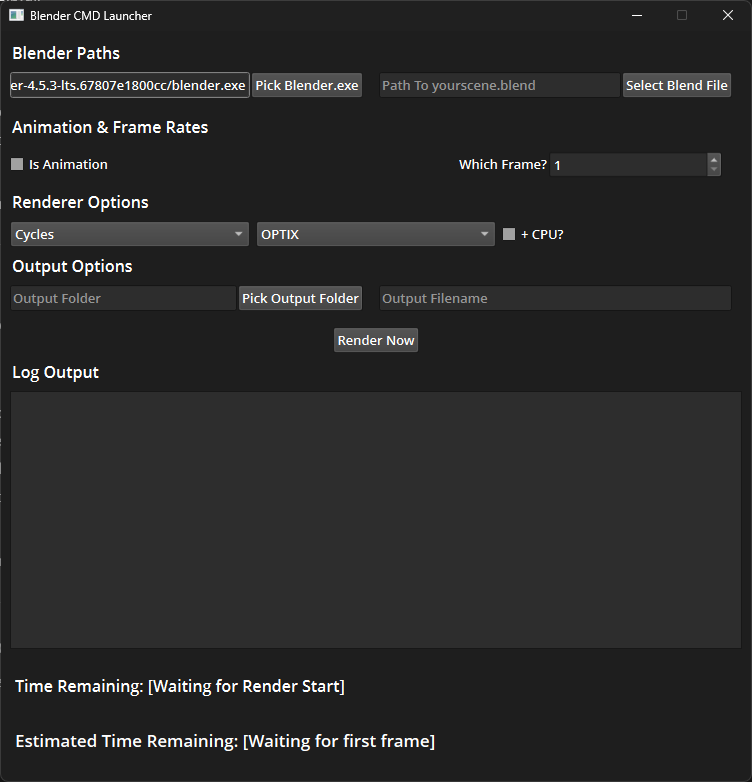
Figure: Screenshot of the main Blender CMD Launcher interface
¶ Usage
- Open Blender CMD Launcher
- Select a path to your Blender executable
- Select the path to your Blend file
- Choose to render a single frame or tick
Is animationto choose the frame range to render - Select your Render Engine and API type
- Choose an output folder and a filename. Filename uses Blender's
###system for frame numbers. - Hit Render and wait.
¶ Download
If you'd like to try it out you can grab it from the Github repo:
You can either clone the repo to build/run from source or you can head to releases to grab the latest Windows EXE.